Integrating the WHISPERING TALES Ghost Mug Wrap into Your Sublimation Workflow
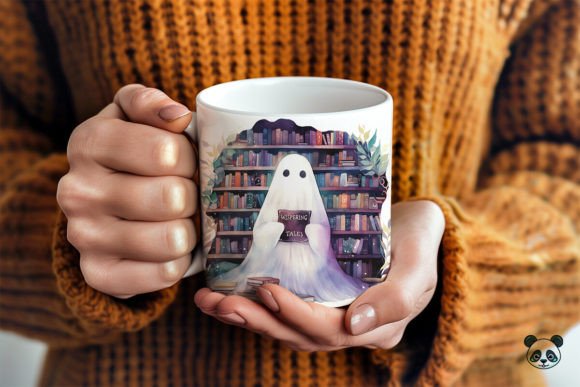
In the competitive landscape of custom merchandise, efficiency and design quality are the twin pillars of a successful small business or creative hobby. For creators specializing in sublimation printing, the difference between a profitable product line and a cluttered inventory often comes down to the reliability of digital assets. The WHISPERING TALES Ghost Mug Wrap represents more than just a seasonal graphic; it is a streamlined component designed to fit seamlessly into established production workflows. By utilizing high-quality, pre-formatted digital assets, creators can reduce preparation time, minimize errors, and maintain consistent output quality across their custom mug design projects.
This article explores how to effectively integrate this specific mug wrap template into your broader creative and business processes. We will examine the technical specifications, discuss compatibility with standard design software, and outline best practices for ensuring that your 3D mug design translates perfectly from screen to physical product.
Understanding the Asset Structure and Technical Specifications
Before implementing any new design element into your workflow, it is crucial to understand its technical foundation. The WHISPERING TALES Ghost Mug Wrap is delivered as an instant digital download, specifically formatted to meet the rigorous demands of professional sublimation graphics. Upon purchase, you receive a single ZIP file containing a high-resolution PNG file. This file measures 9.75 inches by 4.75 inches at 300 DPI (dots per inch).
These specifications are not arbitrary. The 9.75 x 4.75-inch dimension is the industry-standard printable area for most standard 11-ounce ceramic mugs. By adhering to this exact size, the mug wrap illustration eliminates the need for manual resizing, which can often lead to pixelation or aspect ratio distortion. The 300 DPI resolution ensures that when the image is transferred via heat press, the edges remain crisp, and the details of the ghost artwork do not appear blurry or jagged. This level of precision is essential for maintaining a professional appearance in your mug decoration efforts.
It is important to note that this asset is a raster image (PNG), not a vector file (SVG). This distinction dictates how you interact with the file. While SVGs are ideal for cutting machines like Cricut or Silhouette, PNGs with transparent backgrounds are optimized for direct printing. Therefore, this mug wrap clipart is intended strictly for sublimation printing design workflows. Understanding this limitation early prevents workflow bottlenecks where creators might attempt to use the file for vinyl cutting or laser engraving, which requires vector paths.
Preparation and Software Compatibility
Successful integration of the WHISPERING TALES Ghost Mug Wrap begins with proper file management and software selection. Since the file is delivered in a ZIP archive, the first step in your process is extraction. You will need a computer capable of unzipping the file. Once extracted, the PNG file can be imported into any design editing program that supports layered images and transparent backgrounds. Popular choices include Adobe Photoshop, Canva, CorelDRAW, and Affinity Designer.
For those building a sublimation bundle or creating complex compositions, the transparent background of the PNG is a significant advantage. It allows you to layer the ghost design over other sublimation elements, such as textured backgrounds, typography, or additional mug wrap clipart, without worrying about white boxes or unwanted borders. This flexibility supports a modular approach to design, where you can create multiple variations of a personalized mug by swapping out background colors or adding custom text while keeping the core ghost illustration intact.
When setting up your canvas in your design software, ensure that your document settings match the print requirements. Even though the PNG is already sized correctly, verifying that your workspace is set to CMYK or sRGB (depending on your printer’s profile) and 300 DPI will help you visualize the final output accurately. This step is part of quality control, ensuring that what you see on screen closely resembles the final sublimation mug.
Workflow Integration: From Design to Production
The true value of a ready-to-use mug wrap collection item lies in its ability to accelerate the production timeline. In a typical custom order scenario, a creator might spend hours sketching, vectorizing, and formatting a design from scratch. With the WHISPERING TALES Ghost Mug Wrap, the design phase is condensed into minutes. This efficiency allows entrepreneurs and freelancers to handle higher volumes of orders or dedicate more time to marketing and customer service.
Here is a practical workflow example for integrating this asset:
- Order Receipt: A customer requests a Halloween-themed mug with their name added to the design.
- Asset Retrieval: Locate the extracted PNG file from your organized digital library.
- Composition: Open your design software and place the ghost PNG onto the canvas. Add the customer’s name using a complementary font. Because the PNG has a transparent background, the text can be placed behind or in front of the ghost elements without manual masking.
- Preview and Adjust: Use a 3D mug design mockup tool if available to visualize how the wrap will look on the curved surface. This helps in positioning text so it doesn’t get lost in the handle area or the seam.
- Printing: Print the design on sublimation paper using dye-sub ink. Ensure your printer settings are aligned for high-quality photo printing to capture the nuances of the mug artwork.
- Pressing: Wrap the printed paper around the mug and apply heat according to your press’s specifications. The high-resolution source file ensures that the transfer is clean and vibrant.
This streamlined process reduces the cognitive load on the creator. Instead of worrying about whether the design is "good enough," you can focus on execution consistency. This is particularly valuable during peak seasons like Halloween, where speed and volume are critical.
Quality Control and Long-Term Usability
Maintaining consistency across multiple prints is a hallmark of a professional operation. When using digital assets like the WHISPERING TALES Ghost Mug Wrap, quality control begins with the source file. Since you are working with a fixed 300 DPI PNG, you must avoid scaling the image up beyond its original dimensions. Enlarging a raster image results in loss of clarity, which defeats the purpose of using a high-quality digital mug wrap. If you need to adapt the design for larger mugs, such as 15-ounce versions, you would need to check if the provider offers a different size or use specialized software to upscale with AI assistance, though sticking to the intended 11-ounce size is recommended for best results.
Another aspect of long-term usability is organization. As you accumulate various sublimation clipart and mug wrap templates, having a structured filing system becomes essential. Tagging files by theme (e.g., "Halloween," "Ghost," "Spooky"), format (PNG), and size (11oz) allows for rapid retrieval. This organizational habit supports scalability; as your business grows, the time saved in searching for assets compounds significantly.
Furthermore, understanding the limitations of sublimation printing helps in managing customer expectations. Sublimation works best on white or light-colored polyester-coated ceramics. The vibrant colors of the ghost design will appear muted on dark mugs. By knowing these material constraints, you can guide customers toward the best products for your custom design mug offerings, reducing returns and dissatisfaction.
Expanding Your Creative Possibilities
While the WHISPERING TALES Ghost Mug Wrap is a standalone asset, it serves as a building block for broader creative exploration. Creators can combine this ghost illustration with other sublimation elements to create unique themed collections. For instance, pairing the ghost with autumn leaves, pumpkins, or spooky typography can result in a diverse mug wrap set that appeals to different customer tastes. This modularity encourages experimentation without the risk of starting from zero.
Additionally, this asset can be used for purposes beyond mugs. The high-resolution PNG can be adapted for other flat sublimation products such as coasters, mouse pads, or tote bags, provided the dimensions are adjusted appropriately within the design software. This versatility increases the return on investment for the digital download, allowing you to maximize the utility of a single purchase across multiple product lines.
In conclusion, the WHISPERING TALES Ghost Mug Wrap is a practical tool for modern creators who value efficiency and quality. By understanding its technical specifications, integrating it into a structured workflow, and adhering to best practices in sublimation printing, you can enhance your productivity and deliver superior products to your customers. Whether you are a seasoned entrepreneur or a hobbyist looking to refine your craft, leveraging high-quality digital assets is a strategic move toward sustainable creative growth.